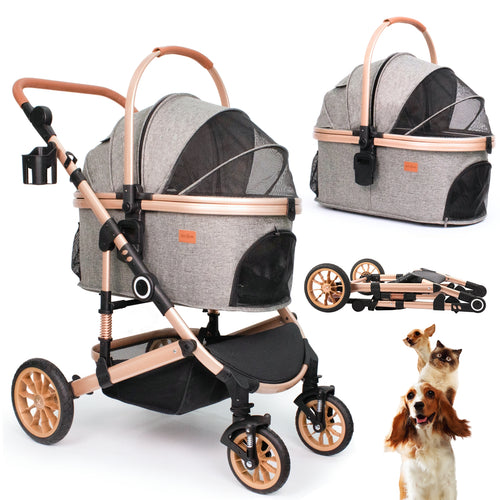

Use this model-specific guide to disassemble the Bicystar HLD-X6DD pet stroller for storage or transport. This is written for new owners and matches the disassembly video sections.
Quick Summary
This guide shows how to disassemble the Bicystar HLD-X6DD pet stroller for storage or travel. You will remove the wheels, flatten the carrier, and remove the canopy.
Before you start, remove your pet, park on a flat surface, and engage the brake.
If a part feels stuck, stop and check the release button position. Pull straight out instead of twisting.
Product Snapshot
- Model HLD-X6DD
- Category pet stroller
- Max Load Up to 50 lbs (pet body length < 23")
- Best Fit 1 medium pet or 2 small pets
- Wheel Sizes Front 7" / Rear 10" (solid rubber)
- Carrier Inner Size 9.4" H × 26" L × 14.2" W
Disassembly Video
Watch the disassembly video below and jump to the section you need.
Parts to Remove (Keep Track of These)
| Part | What it is | Qty |
|---|---|---|
| A | Rear wheels | 2 |
| B | Front wheels | 2 |
| C | Carrier | 1 |
| D | Carrier connectors | 2 |
| E | Canopy | 1 |
Tip: Put small parts (like connectors) into a bag or container right away so they don’t get lost.
Main Disassembly Steps
Follow these steps in order for the HLD-X6DD. Each step matches the disassembly video.
Before You Start
- Remove your pet from the stroller/carrier.
- Park on a flat surface.
- Engage the one-touch brake so the stroller cannot roll.
- Prepare a small bag/container for removed parts.
Remove Wheels
Pull wheels straight out. Avoid twisting or pulling at an angle.
- Rear wheels: Press the button on the side of the wheel hub, then pull the wheel straight out. Repeat on the other side.
- Front wheels: Press and hold the release on the wheel mount, then pull the wheel straight out. Repeat on the other side.
Flatten the Carrier
- Place the carrier on a table or clean floor.
- Remove the pad/liner.
- Release the internal support frame from the base. Pull firmly to pop each end out of the bottom slots.
- To lay the carrier completely flat, press the release buttons on the connectors (they face inward), then detach both connectors.
- Store the connectors safely so they don’t get lost.
Remove the Canopy
- Fold the canopy upright (vertical position).
- Use a relatively blunt tool to press the release button and nudge upward slightly.
- While pressing the button, pull the canopy straight up to detach.
- Remove one side first, then repeat on the other side.
PDF User Manual
Download the full HLD-X6DD PDF manual for diagrams, official part names, and reference steps.
FAQ
Do I remove the rear wheels or front wheels first?
A wheel is stuck. What should I do?
How do I completely flatten the carrier?
What tool should I use to remove the canopy?
I lost a connector or need a replacement part. Where can I order it?
Where can I find official support for the HLD-X6DD?
Support
If you need help with the HLD-X6DD, contact Bicystar support at anita@bicystar.com.
Please include your model number, shipping address, and photos or video of the issue so support can review it quickly.
Trust / Warranty Note
Use only parts intended for model HLD-X6DD. For warranty or service questions, email anita@bicystar.com and include your model number plus clear photos/videos of the issue.
```